
|
|
NOVA scienceNOW: Profile: James McLurkin
|
|
|
|
Viewing Ideas
|
|
|
Before Watching
-
Many of your students have never experienced life without
computers. Help them develop a clearer understanding of their
personal, and society's, dependence on computers. Have them
brainstorm a list of the ways computers are used today. Ask
them: What roles do computers play in our lives? (Some examples
include personal computers that help us write research papers or
e-mail, calculators that make number crunching quick and easy,
and computer chips that help our cars, microwave ovens, VCRs,
cell phones, and other appliances run.) How would our lives
change if computers did not exist?
Then, have students brainstorm a list of city and state agencies
with back-up systems that allow them to continue to provide
critical services in the event of a power or computer failure
(airlines, hospitals, nuclear power plants, fire departments,
etc.).
Finally, you might also have students interview older caregivers
or friends, asking how they perform tasks for which we now use
computers.
-
It used to be that Christmas tree light strings were wired bulb
to bulb. If any bulb burned out, the whole string went dark. The
more bulbs in the string, the more likely the string would fail
because the additional bulbs meant more chances of failure. One
of the first electronic computers was ENIAC, first operated on
behalf of the U.S. Army in 1944. Like the old Christmas tree
lights, ENIAC's 19,000 vacuum tubes were a constant source of
failure. Technicians continuously circulated among its banks to
change burned-out tubes as it operated. Help students understand
how parallel and series circuits work.
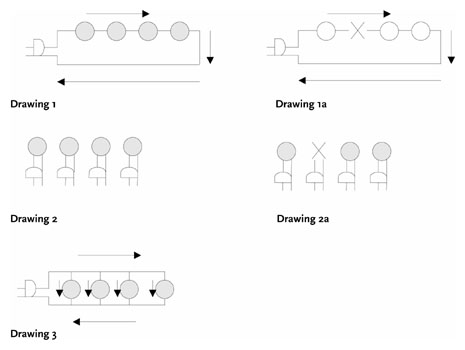
Sketch Drawing 1 on the board. Have students trace the flow of
electricity from one blade of the plug through all four light
bulbs and back to the other blade of the plug. Next, erase one
of the bulbs and replace it with a large X (see Drawing 1a). Ask
whether the other bulbs would be able to light. (No.) Ask why
all bulbs would be dark. (Pathway is broken.) Explain that this
is a series circuit. Ask students to theorize why early versions
of ENIAC would only run for about 20 minutes before a failure.
(Many vacuum tubes create many opportunities for the pathway to
break.)
Sketch Drawing 2 next to Drawing 1. Explain that each bulb has
its own plug. Now, erase one of the bulbs and replace it with a
large X (see Drawing 2a). Ask whether the other bulbs would be
able to light. (Yes.) Ask why the other bulbs would light. (They
are on separate pathways.)
Ask students to design a circuit that has only one plug, but all
bulbs have a separate pathway to that plug. Have students share
their designs. Sketch Drawing 3 after students have had a chance
to try the challenge.
Explain that Drawing 3 shows a parallel circuit. Ask students
which circuit, series or parallel, is most likely to stay lit if
a bulb burns out. Explain that James McLurkin designs computers
that are made of many small computers working together. Ask
whether McLurkin's computer robots are more like a series or a
parallel circuit. (Parallel: Many robots represent many pathways
to accomplish a task; when one fails, the others continue the
task.)
-
Today, computers seem to effortlessly perform very complicated
tasks. These tasks are actually based on thousands or even
millions of simple step-by-step instructions painstakingly
written by computer programmers. A single bad or missing
instruction reveals that computers are really just mindless
devices.
List the following common tasks on the board: making a peanut
butter and jelly sandwich, making chocolate milk from syrup, and
brushing your teeth. Divide your class into four-member teams.
Have each team choose one of the tasks. Explain that each
student should write a set of instructions to successfully
complete the chosen task. To simulate programming commands, tell
students to write brief but clear instructions with only one
action per line. Tell the teams that when they finish, each
writer should read his or her instructions one step at a time
while another team member acts them out. The remaining team
members should look for any missing instructions or instructions
that can be misinterpreted. For example, "Put the peanut butter
on the bread" could lead to a jar sitting on an unwrapped loaf
of bread. Ask teams to share some of the hilarious programming
errors that they detected. In what ways is programming easy and
difficult at the same time? How might you keep track of the
instructions in a program that contained 1,000 lines?
After Watching
-
James McLurkin says the first rule about robots is that they are
"profoundly stupid." They must be carefully and painstakingly
programmed to be successful. His robots were unable to complete
a music demonstration because of a programming error. Ask
students to give examples of robots they are familiar with from
books, television, and movies. How do McLurkin's real-world
robots compare with these fictional robots?
-
McLurkin is very careful and schedules every detail of his
activities on his computer, but it doesn't always help him stay
on schedule. Why does this happen? Have students create
flowcharts (or a step-by-step pictorial representation) of their
day. First, discuss different ways students can create a
flowchart. (It could be simply a series of boxes containing
times and tasks connected by arrows.) Ask them to make a
flowchart that includes everything they think they will do the
next day. The flowchart should be fairly detailed. As they go
through the day, have them keep a timed log of what they
actually do. Then, have them compare the real-life log to
their flowchart. Were they behind? Were they ahead? On schedule?
Was there duplicate effort or unnecessary tasks? What
adjustments do they need to make in their schedules to make
their days more efficient and the flowchart more accurate? Make
a new flowchart for the following day and test it out. Did their
efficiency increase? What was it like to have a flowchart for
their life? How, if at all, did it change their life?
-
This activity demonstrates how a large number of students
(computers) can be programmed so that simple arithmetic
operations can be carried out without anyone coordinating the
process. (You may want to review the
Data Flow Diagram
before doing the activity with students in order to see how
information travels between groups of students in the activity.)
-
Put students into the following four groups:
- The Result
- First Number
- Second Number
- Operation
-
Tell the students that you will give them a copy of their
group's written instructions to review. You will then say
"RUN," at which point they should stand up and execute the
written instructions. After their group has performed its
task, they should continue to display the results so other
groups can see them.
-
To "program" the groups, copy the Instructions for Groups
(PDF
or
HTML) handout. Cut up each group's instructions and distribute
it to the appropriate group.
-
Review each group's instructions with them and ask them to
demonstrate their programming.
-
Give the First and Second Number Groups a number and the
Operation Group an operation (for example, 14 - 8 = 6).
Remember that the largest number that can be displayed by
any group is twice its membership.
-
Explain that after this activity begins, students are not to
communicate with each other. They are to carefully follow
all of the programming (instructions), observe, and react.
-
Start the calculation by saying "RUN." Assist the first
attempt, as necessary.
-
Once the groups have completed their programming, count the
Result Group hands and share the original operation and the
results. Repeat with a new arithmetic operation, as desired.
After the first run, you can test the resiliency of your
distributed computer by asking several students to sit down
during a run. Does the computer adapt and correct for these
losses? Ask students how James McLurkin's small computers are
like this distributed class computer. How would using 24
distributed computer robots be more effective than a single,
very smart robot mapping a cave system or looking for a lost
child?
|
|










