
PBS KIDS invites parents, caregivers, and kids ages 3-8 with a variety of abilities to participate in our playtesting program. Participation is voluntary and happens virtually via Zoom. Play our yet-to-be-released games and help us make them the best we can!
Instructions for Device Set-Up
We use Zoom to playtest and will send a link to the call ahead of time. There are a few ways to share your device:
Option 1
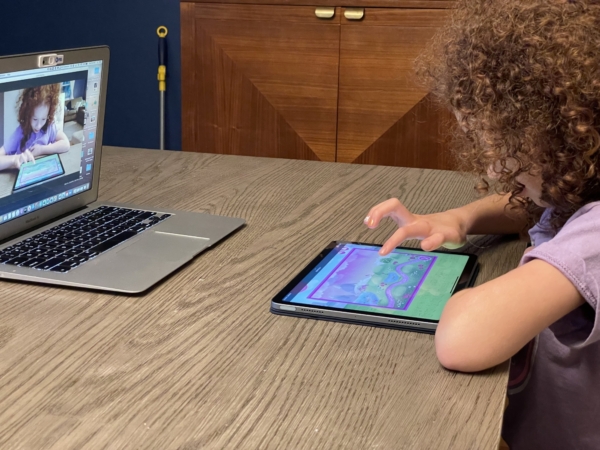
Place the touch device flat on the table at the foot of a laptop and tilt the laptop screen down to point the camera at the device. The brightness on the touch device should be set to medium brightness for best results.
Option 2
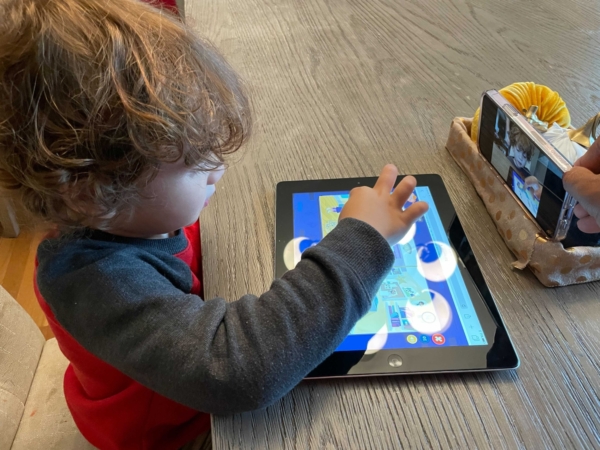
If you don’t have a laptop camera, you can use a device (#1) to video chat and another device (#2) to play. Point the camera from device #1 at device #2. The brightness on device #2 should be set to medium brightness for best results.
Option 3
If your child is playing on the same laptop as the Zoom call, share your screen in Zoom using the green share screen button (see below).

Additional Information
Can my child try the game ahead of time?
We prefer our playtesters wait until their scheduled session to play for the first time. We want to see their first reactions to the game.
What should I do as a parent or caregiver during playtesting?
Please stay nearby in case we have technical difficulties that require adult assistance.
Please let your playtester play the game unassisted. We want to see if our games are understandable enough for kids to play on their own.
Privacy
No video or photos are captured without permission. This is all live so we can see first reactions to a game, understand what your child is learning from the game, and what they like or don’t like about it.